At a Glance
This article explains how AI agents use tools, execute code, leverage MCP, and combine multiple functions to retrieve information, automate workflows, and safely perform real-world tasks beyond text generation.
In Part 1 we covered what Agentic AI is. In Part 2 we explored the Reflection Pattern — how AI reviews and improves its own work. Now in Part 3 we tackle Tool Use: the design pattern that lets AI stop just generating text and actually take action in the world.
The problem with a brain that can’t touch anything
An AI language model, by itself, is like an incredibly well-read person locked in a room with no phone, no internet, and no way to interact with the outside world.
Ask it what time it is? It doesn’t know — it was trained months ago and has no access to a clock.
Ask it to find Italian restaurants near you? It can only recall what it learned during training — not live data from the web.
Ask it to check your calendar and book a meeting? It has no idea what’s on your calendar.
This is the fundamental limitation of a language model on its own. It can reason, write, summarise, and explain — but it can’t do anything. It can’t reach out and get new information. It can’t take action.
Tool use is what changes that.
What is a tool, exactly?
In the context of Agentic AI, a tool is just a function — a piece of code that does something specific.
get_current_time()— returns the current timesearch_web(query)— runs a web search and returns resultsquery_database(sql)— runs a database query and returns datasend_email(to, subject, body)— sends an emailgenerate_qr_code(url, filename)— creates a QR code image
That’s it. Nothing exotic. Just functions.
What makes tool use powerful is that you give the LLM access to these functions and let it decide for itself when to call them. The AI isn’t just generating text anymore — it’s choosing what action to take based on what the user needs.
How tool use actually works step by step
Here’s what happens under the hood when an AI uses a tool:
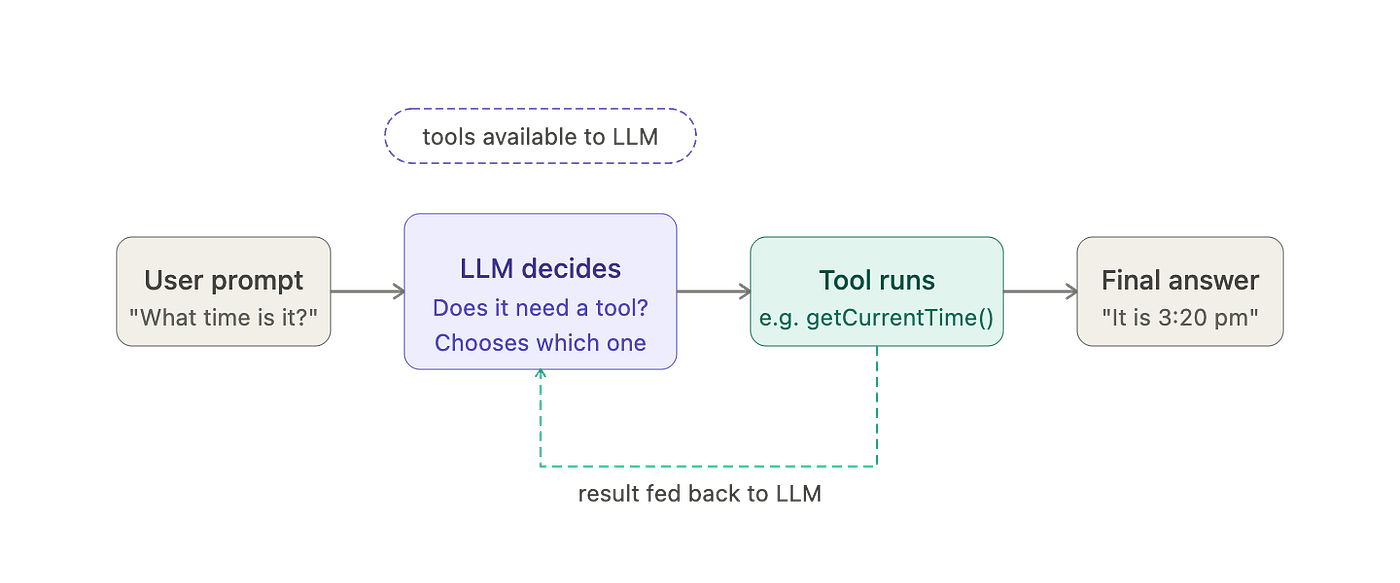
- You send the LLM a prompt — say, “What time is it?”
- The LLM looks at the tools available to it and decides: I need to call
get_current_time()to answer this - The LLM signals that it wants this function called (it doesn’t call it directly — it requests the call)
- Your code runs the function, gets the result — say,
3:20 PM - That result is fed back to the LLM as part of the conversation
- The LLM uses that information to generate its final response: “It’s currently 3:20 PM”
One important nuance: the LLM doesn’t directly execute the function. It outputs a signal saying “I want this function called with these arguments.” Your code — or a library like AISuite — intercepts that signal, runs the actual function, and passes the result back. The LLM then continues from there.
This is also why tool use is selective. If you ask the same AI “How much caffeine is in green tea?”, it doesn’t need to call get_current_time() — it already knows the answer. So it just responds directly, without invoking any tool. The AI makes that judgment call on its own.
A simple example: Turning a function into a tool
Here’s what this looks like in code using AISuite — a library that handles the plumbing of tool calling automatically:
from datetime import datetime
import aisuite as ai
client = ai.Client()
def get_current_time():
    """
    Returns the current time as a string.
    """
    return datetime.now().strftime("%H:%M:%S")

response = client.chat.completions.create(
    model="openai:gpt-4o",
    messages=[{"role": "user", "content": "What time is it?"}],
    tools=[get_current_time],
    max_turns=5
)
That’s it. You pass the function to the tools parameter. AISuite reads the function’s docstring to understand what it does and describes it to the LLM automatically. No manual configuration needed.
The max_turns parameter just sets a ceiling on how many tool calls can happen in sequence — useful to prevent runaway loops. In practice, you rarely hit it.
Giving the AI multiple tools
Most real applications don’t have just one tool — they have several. And the AI has to figure out which one to use for which task.
Take a calendar assistant. You might give it three tools:
check_calendar()— see when you’re freemake_appointment()— book a meeting and send an invitedelete_appointment()— cancel an existing entry
Now give it the instruction: “Find a free slot on Thursday and book a meeting with Alice.”
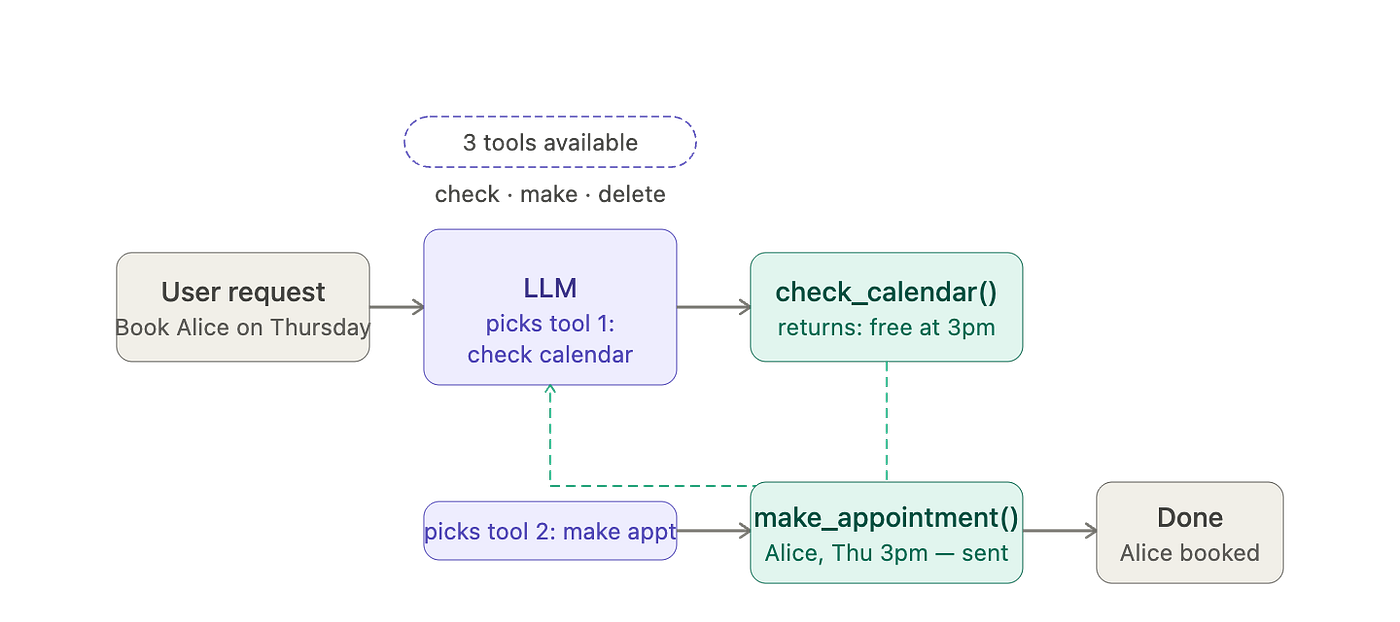
The AI figures out the right sequence on its own:
- First call
check_calendar()to see when Thursday is free — returns 3 PM available - Use that result to call
make_appointment()with Alice at 3 PM - Confirm back to you: “Done — Alice is booked for Thursday at 3 PM”
No one told it to do step 1 before step 2. It reasoned that it needed the calendar data before it could make the appointment. That’s the intelligence layer on top of the tool layer.
And critically — the tools you make available determine what the agent can and cannot do. If you don’t include delete_appointment() in the tool list, the agent simply cannot cancel meetings, no matter how clearly you ask. The available tools define the agent’s capabilities.
Code execution: The most powerful tool of all
Of all the tools you can give an LLM, there’s one that deserves special attention: the ability to write and execute code.
Here’s why it’s special. Imagine building a math assistant. You might create tools for addition, subtraction, multiplication, and division. But what about square roots? Exponentiation? Logarithms? Interest calculations? Statistical formulas?
Are you going to build a separate tool for every mathematical operation ever conceived?
Instead, you can give the AI a single tool: a code execution environment. Tell it: “You can write Python code, and I’ll run it for you.”
Now when someone asks “What’s the square root of 2?”, the AI writes:
import math
result = math.sqrt(2)
print(result)
Your system runs that code and gets back 1.4142135.... That gets fed to the AI, which formats a nice response.
One mathematical function replaced an infinite number of individual tools. That’s the power of code execution.
It also connects back to what we covered in Part 2 — reflection. If the AI writes code that fails with an error, you feed that error message back to the AI as external feedback. The AI then reflects on what went wrong, rewrites the code, and tries again. The same reflection loop that improved essay quality also improves code quality.
One important caution: Letting an AI execute arbitrary code carries real risk. There’s a real example of an agentic coder that accidentally deleted an entire folder of Python files while trying to clean up a project. The developer had a GitHub backup so no real harm was done — but it illustrates the point. Best practice is to run AI-generated code in a sandbox environment (like Docker or E2B) that limits what it can access and delete. In practice many developers skip this for low-stakes tasks, but for anything touching important files or databases, sandboxing is worth the effort.
MCP: The standard that’s making all of this easier
Building tools one by one is powerful but repetitive. If you’re building an app that needs to read from Slack, pull files from Google Drive, query a GitHub repo, and connect to a Postgres database — you’d have to write custom wrappers for each one.
And if another team is building a different app that also needs Slack, Google Drive, and GitHub — they write the same wrappers all over again.
This is an M × N problem. M apps each building N tool integrations = M × N total work being done by the developer community.
MCP (Model Context Protocol) was created to solve this. It’s an open standard — originally proposed by Anthropic, now adopted broadly across the industry — that defines a common way for AI applications to connect to tools and data sources.
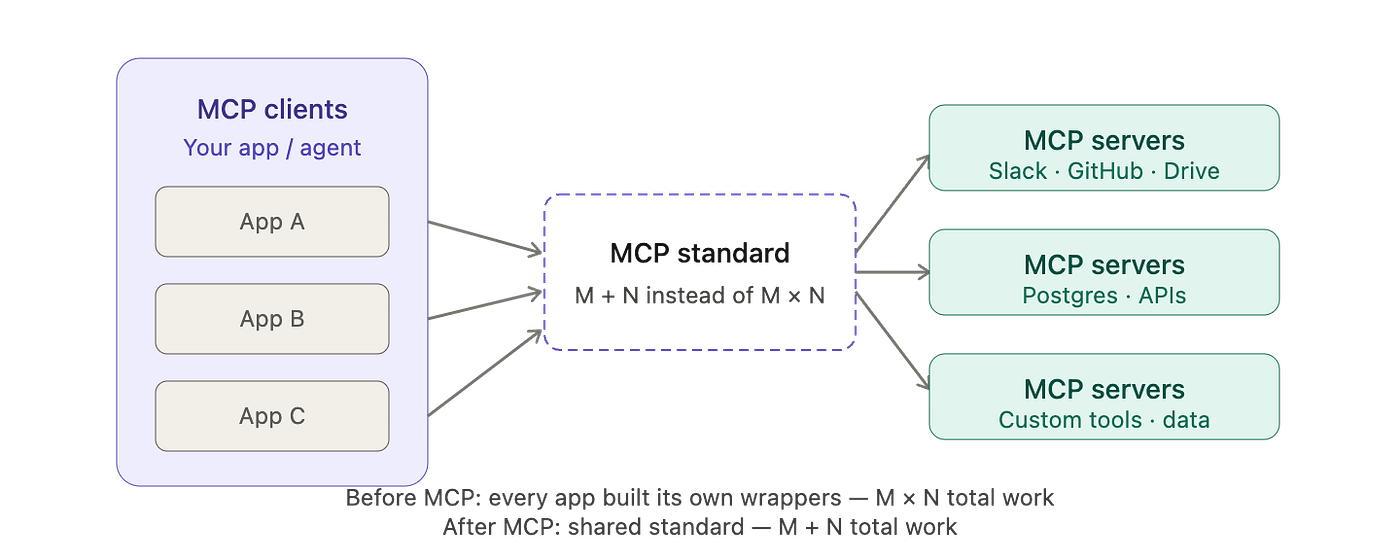
With MCP:
- Tool providers build an MCP server once — a standardised wrapper around their API
- App developers build an MCP client once — a standardised way to consume tools
- Any client can connect to any server
M + N work instead of M × N. The same integration that lets one app read GitHub repos can instantly be used by any other app that speaks MCP.
Today there’s a rapidly growing ecosystem of MCP servers — for Slack, GitHub, Google Drive, various databases, and many more — and MCP clients built into AI development tools. When you build an agentic application, instead of writing every integration yourself, you can plug into this ecosystem and immediately have access to a wide range of tools.
What makes a good tool
A few practical principles:
- Write clear docstrings
Libraries like AISuite use your function’s docstring to explain the tool to the LLM. A vague or missing docstring means the AI won’t know when or how to use the tool properly. Be specific about what the function does and what its parameters mean.
❌ Avoid:
def get_user(id):
    """Gets user."""
    ...
✅ Prefer:
def get_user(user_id: str) -> dict:
    """Fetches a user's profile by their unique ID.
    Returns name, email, and account status.
    Raises ValueError if the user does not exist."""
    ...
2. One tool, one job.
Each tool should do one thing clearly. A tool that sends emails AND queries the database AND generates reports is harder for the AI to reason about than three separate focused tools.
❌ Avoid:
handle_report(query, recipient, format) — queries data, builds a report, and emails it all in one call.
✅ Prefer:
Three tools — query_sales_data(), generate_report(), send_email() — each doing one step. The agent can then chain them as needed, or use just one if that’s all the task requires.
3. Return consistent, compact output.
The tool’s output gets fed back to the LLM as part of the conversation. Clean, structured output (like a short JSON object or a plain string) is easier for the AI to work with than a wall of messy text.
❌ Avoid:
Returning a raw database row dump — (1, 'Alice', None, 'alice@example.com', True, 2024-01-01, ...) — with no labels or structure.
✅ Prefer:
{ "user_id": "1", "name": "Alice", "email": "alice@example.com", "active": true }
The tools you include define what the agent can do. This sounds obvious but it’s easy to overlook. If users will ask the agent to delete emails but you didn’t include a delete tool, the agent will try and fail every time. Think through the full range of tasks your agent needs to handle, then make sure every required tool is in the list.
Key takeaways
- Tools are just functions — code that does something specific — that you make available for an LLM to call
- The LLM decides on its own whether and when to use a tool based on what the user needs
- The LLM doesn’t run the function directly — it requests the call, your code runs it, and the result is fed back
- Multiple tools can be given at once; the AI figures out which to use and in what order
- Code execution is the most powerful tool — it replaces an infinite set of individual tools with one general-purpose capability
- Always sandbox AI-generated code execution for anything involving important files or data
- MCP (Model Context Protocol) is the emerging standard that lets AI apps connect to a growing ecosystem of shared tools without building every integration from scratch
- Good tools have clear docstrings, focused responsibilities, and clean return values
What’s coming in this series
- Part 1: What is Agentic AI? Core concepts, design patterns, and the autonomy spectrum -> Read Here
- Part 2: The Reflection Pattern — how AI reviews and improves its own work -> Read Here
- Part 3 ← You’re here: Tool Use — giving AI the ability to search, code, and act in the real world
- Part 4: Evals and Practical Tips — the disciplined process that separates good builders from great ones
- Part 5: Highly Autonomous Agents — planning, multi-agent systems, and where this is all headed
Follow for Part 4 — which covers what I think is the most underrated skill in building agentic AI: evaluations. It’s what separates the teams that ship reliable systems from the ones that are always guessing.
This article was originally published on Medium.